Alert management
Security alerts and notifications for the AI agent ecosystem. Monitor suspicious activities, capability violations, trust score drops, and security policy breaches. Configure alert rules, set severity thresholds, and integrate with existing incident response workflows.
API examples note: Examples use $AIM_URL, your AIM server (http://localhost:8080 for a local deployment).
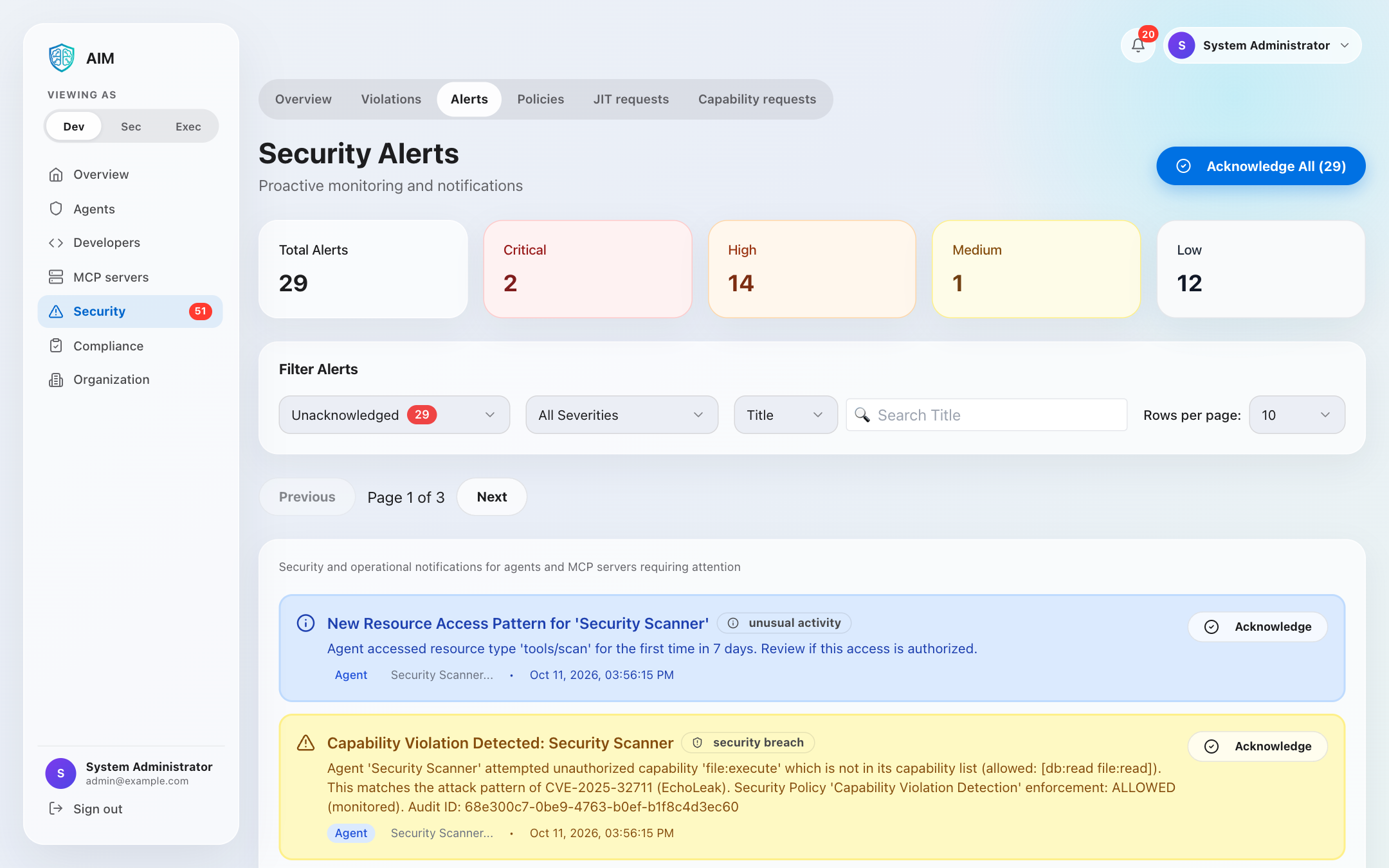
Critical alerts: Immediate notification for security breaches, unauthorized access attempts, and trust score drops below critical thresholds. These require immediate attention.
Alert severity levels
Critical
Security breaches, data exfiltration attempts, multiple authentication failures, or complete trust score collapse. Requires immediate action.
High
Capability violations, significant trust score drops, suspicious behavior patterns, or policy breaches. Investigate within 1 hour.
Medium
Rate limit violations, minor trust score fluctuations, configuration drift, or unusual API usage patterns. Review within 24 hours.
Low
Informational alerts, certificate expiration warnings, maintenance reminders, or usage threshold notifications. Review during normal operations.
Alert types
Security alerts
- • Authentication failures: Multiple failed login attempts
- • Unauthorized access: Attempts to access restricted resources
- • Capability violations: Agent exceeding granted permissions
- • Trust score drops: Sudden decrease in agent trust scores
- • Anomalous behavior: Unusual patterns detected by behavioral analysis
- • Certificate issues: Expired or invalid certificates
- • Configuration drift: Unauthorized configuration changes
- • Data exfiltration: Suspicious data access patterns
Alert management API
List alerts
curl -X GET "$AIM_URL/api/v1/admin/alerts?status=unacknowledged&severity=high,critical" \
-H "Authorization: Bearer YOUR_TOKEN"{
"alerts": [
{
"id": "alert_9kL4n6oZ0rN5sT8v",
"type": "trust_score_drop",
"severity": "critical",
"status": "unacknowledged",
"title": "Critical Trust Score Drop Detected",
"description": "Agent 'prod-assistant' trust score dropped from 85 to 42 in 1 hour",
"agent_id": "agent_2KL9m3nX8fY5pQr7",
"metadata": {
"previous_score": 85,
"current_score": 42,
"drop_percentage": 50.6,
"time_window": "1h"
},
"created_at": "2024-01-15T14:30:00Z",
"updated_at": "2024-01-15T14:30:00Z"
},
{
"id": "alert_7hJ3m5nY8qM4pS6u",
"type": "capability_violation",
"severity": "high",
"status": "unacknowledged",
"title": "Unauthorized Database Access Attempt",
"description": "Agent attempted to write to restricted table 'users'",
"agent_id": "agent_3LM8n4oY9qN6tR8u",
"metadata": {
"capability": "db:write",
"resource": "users_table",
"action": "UPDATE",
"denied_reason": "insufficient_trust_score"
},
"created_at": "2024-01-15T14:25:00Z",
"updated_at": "2024-01-15T14:25:00Z"
}
],
"total": 2,
"page": 1,
"limit": 20
}Acknowledge alert
curl -X POST $AIM_URL/api/v1/admin/alerts/alert_9kL4n6oZ0rN5sT8v/acknowledge \
  -H "Authorization: Bearer YOUR_TOKEN" \
  -H "Content-Type: application/json" \
  -d '{
    "notes": "Investigating root cause - appears to be misconfiguration",
    "assigned_to": "security-team@example.com"
  }'
Resolve alert
curl -X POST $AIM_URL/api/v1/admin/alerts/alert_9kL4n6oZ0rN5sT8v/resolve \
  -H "Authorization: Bearer YOUR_TOKEN" \
  -H "Content-Type: application/json" \
  -d '{
    "resolution": "Fixed misconfigured rate limits causing excessive API failures",
    "root_cause": "Rate limit threshold too low for production workload",
    "actions_taken": [
      "Increased rate limit from 100/min to 1000/min",
      "Added monitoring for future threshold breaches",
      "Updated documentation"
    ],
    "prevent_recurrence": true
  }'
Get unacknowledged count
curl -X GET $AIM_URL/api/v1/admin/alerts/unacknowledged/count \
  -H "Authorization: Bearer YOUR_TOKEN"
Alert configuration
Default alert rules
| Condition | Threshold | Severity |
|---|---|---|
| Trust Score Drop | > 30 points in 1 hour | Critical |
| Failed Auth Attempts | > 10 in 5 minutes | Critical |
| Capability Violation | Any unauthorized attempt | High |
| API Rate Limit | > 90% of limit | Medium |
| Certificate Expiry | < 30 days remaining | Medium |
| Agent Suspension | Any occurrence | High |
| Disk Usage | > 80% capacity | Low |
Alert notifications
Delivery: alert channels send an organization's alerts to Slack, PagerDuty, a Microsoft Teams workflow or email addresses. Webhooks send a JSON POST for two alert events.
Notification channels
An alert the server stores is sent to each active channel of its organization whose severity floor it reaches. The floors rank info, warning, high and critical: a channel whose floor is high is sent high and critical alerts. A repeat counted on an open alert is not sent again, and an alert raised while the delivery queue is full is stored but sent to no channel. Alerts still in the queue when the server stops are not sent.
Sends each recipient, up to 20 per channel, its own plain-text message through the server's email service, chosen with EMAIL_PROVIDER (an SMTP server, for example). A server started without an email service refuses to create an email channel.
Webhook
Sends a JSON POST for two alert events: an alert raised because a capability check was denied for an agent with no granted capabilities, and an alert being acknowledged. Other alerts send no event.
https://your-system.com/webhookSlack
Posts to a Slack incoming webhook URL in Slack's message format: the alert's severity and title, its description, the agent it names and a link to the dashboard's alerts page. The alert's text is escaped, so it cannot notify the channel with a mention such as <!here>.
PagerDuty
Sends a trigger event to the PagerDuty Events API v2 with the channel's 32-character integration key and the alert's id as its dedup key. The AIM severities critical, high, warning and info become the PagerDuty severities critical, error, warning and info.
Microsoft Teams
Posts an Adaptive Card that carries the lines of the Slack message to a Teams workflow whose trigger is "When a Teams webhook request is received". Workflows whose trigger requires a Microsoft Entra token are not supported.
Add a channel
Admins, managers and members add, edit, test and delete channels in the dashboard under Developers, Alert channels, or through the /api/v1/alert-channels routes. This request adds a Slack channel that is sent warning, high and critical alerts:
curl -X POST $AIM_URL/api/v1/alert-channels \
  -H "Authorization: Bearer YOUR_TOKEN" \
  -H "Content-Type: application/json" \
  -d '{
    "name": "Security on-call",
    "kind": "slack",
    "config": {"webhookUrl": "https://hooks.slack.com/services/YOUR_WEBHOOK_PATH"},
    "minSeverity": "warning"
  }'
A pagerduty channel takes {"routingKey": ...}, a teams channel {"webhookUrl": ...} and an email channel {"recipients": [...]}. POST /api/v1/alert-channels/:id/test sends one test message through a channel and records it as the channel's last delivery. A test message to PagerDuty opens an alert on the PagerDuty service the key belongs to; resolve it in PagerDuty.
Drift detection
Approving a configuration drift is not available over the REST API. The /api/v1/admin/alerts routes list alerts, acknowledge or resolve one, acknowledge several at once and count the unacknowledged ones.