Security policies
Configure and enforce security policies across the organization. Define rules for agent behavior, access control, and compliance requirements. Monitor policy violations and receive automated alerts when agents operate outside defined boundaries.
API examples note: Examples use $AIM_URL, your AIM server (http://localhost:8080 for a local deployment).
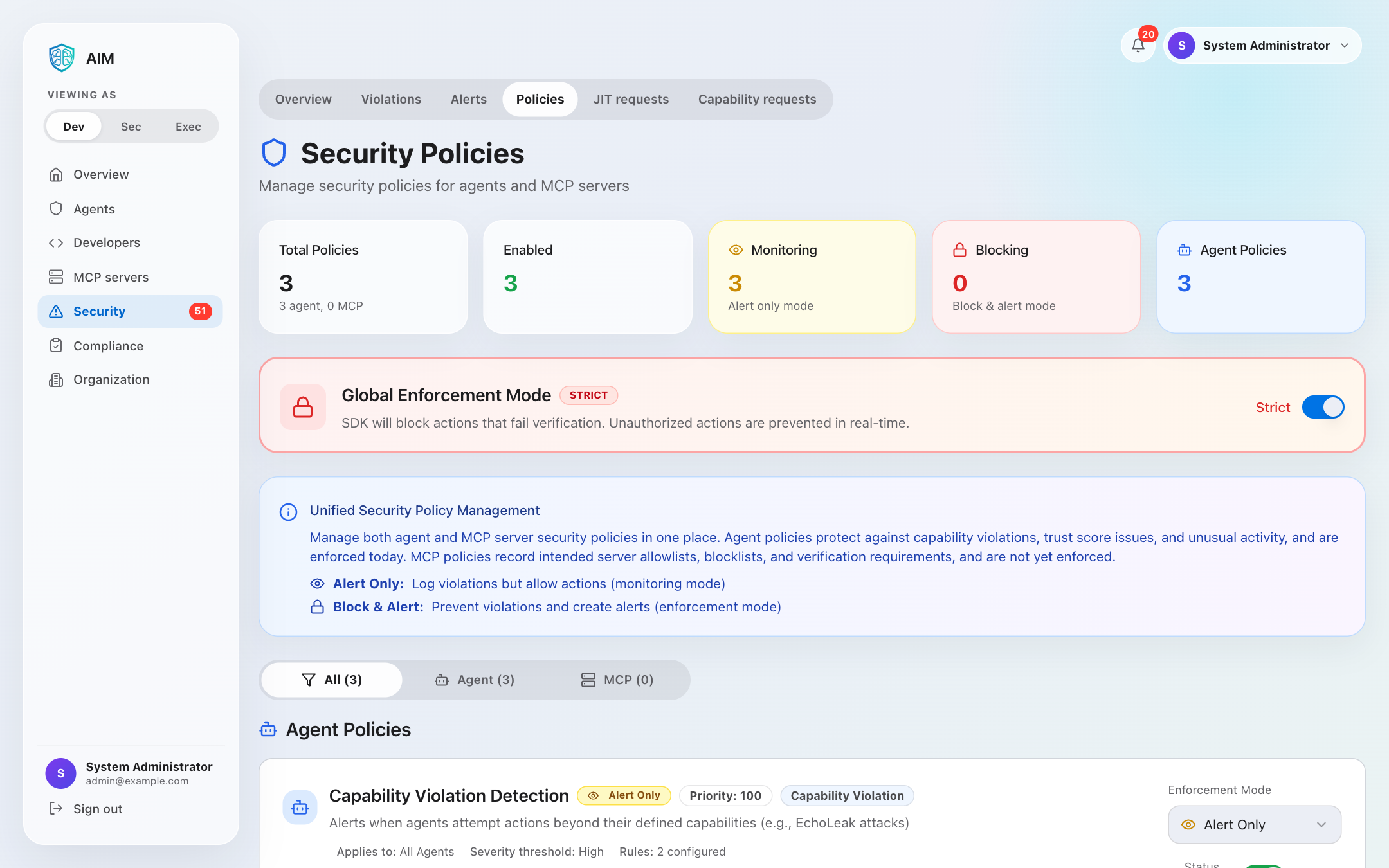
Security: Security policies are evaluated during agent operations. Configure policies once and enforce them automatically across all agents.
Policy types
Recently implemented: Three advanced policy evaluation features are now available with full audit log integration and automated enforcement.
Unusual activity detection
NEWBehavioral detection of abnormal agent behavior patterns and security threats.
- • API rate spike detection with configurable thresholds
- • Off-hours access monitoring (business hours enforcement)
- • Unusual access pattern detection (diverse resource tracking)
- • Time-window based analysis (configurable minutes)
Configuration drift monitoring
NEWTrack and alert on unauthorized changes to agent configuration and permissions.
- • Capability change detection (permission modifications)
- • Public key rotation tracking with approval workflow
- • Permission escalation detection for dangerous capabilities
- • Historical capability comparison
Unauthorized access control
NEWEnforce strict access controls with IP restrictions, time-based rules, and resource-level permissions.
- • IP-based restrictions with whitelist and wildcard support
- • Time-based access control (day-of-week and hour restrictions)
- • Resource-level access control with pattern matching
- • Action-level granular permissions
Access control
Define who can access what resources and under which conditions.
- • Role-based access control (RBAC)
- • Time-based access restrictions
- • IP allowlisting/denylisting
- • Geographic restrictions
Data protection
Protect sensitive data with encryption and access policies.
- • Data encryption requirements
- • PII/PHI handling rules
- • Data retention periods
- • Secure deletion policies
Rate limiting
Prevent abuse with configurable rate limits and throttling.
- • API call rate limits
- • Per-agent quotas
- • Burst protection
- • Adaptive throttling
Audit & logging
Comprehensive logging and audit trail for all policy evaluations.
- • Policy evaluation logging
- • Violation tracking
- • Historical analysis
- • Export for compliance
MCP server policies
MCP policies record which Model Context Protocol servers an organization intends to allow, block, or require capabilities from.
MCP policies are not enforced yet. The four MCP policy types are stored and editable, and the enforcement action shown on each policy below is the value it is configured with. No code path evaluates them today, so no MCP server is currently allowed, blocked, or alerted on by an MCP policy. The agent policies described above are unaffected and are enforced. Progress is tracked in agent-identity-management issue 355.
MCP minimum trust score
Records a minimum trust score for MCP servers, so that servers below it can be identified as potentially risky integrations.
MCP capability requirements
Records which capabilities MCP servers must declare and which they must not expose.
Trusted MCP server domains
Allow MCP servers only from trusted domains (localhost, internal networks, major cloud providers).
Blocked MCP domains
Records MCP server domains that should be blocked as known malicious or untrusted.
High-risk MCP server block
Records that MCP servers with critically low trust scores should be blocked, and that verification should be required.
Global enforcement mode
Key concept: Global enforcement mode determines whether security policies can actually block actions. Individual policy settings (Alert Only vs Block & Alert) are evaluated, but blocking only occurs when global enforcement mode is set to STRICT.
MONITORING mode
Observe and learn without disrupting agent operations. All actions are allowed regardless of individual policy settings.
Behavior:
- ✓All agent actions are allowed
- ✓Policies are still evaluated
- ✓Violations generate alerts
- ✓All actions are logged for audit
- ✗Policy blocking decisions are overridden
Recommended for: Development, testing, gradual rollout, and learning agent behavior patterns.
STRICT mode
Full enforcement of all security policies. Actions that violate blocking policies are denied automatically.
Behavior:
- ✓Policies are fully enforced
- ✓"Block & Alert" policies block actions
- ✓Violations generate alerts
- ✓All actions are logged for audit
- ✓Unauthorized capabilities are blocked
Recommended for: Production environments where security enforcement is critical.
Policy evaluation flow
┌─────────────────────────────────────────────────────────────┐
│                    Action Requested                          │
└─────────────────────────────────────────────────────────────┘
                              │
                              ▼
┌─────────────────────────────────────────────────────────────┐
│              Evaluate Security Policies                      │
│  (Capability Violation, Trust Score, Data Exfiltration...)  │
└─────────────────────────────────────────────────────────────┘
                              │
                              ▼
                  ┌───────────────────┐
                  │ Policy says BLOCK │
                  └───────────────────┘
                              │
          ┌───────────────────┴───────────────────┐
          │                                       │
          ▼                                       ▼
┌─────────────────────┐              ┌─────────────────────┐
│  MONITORING Mode    │              │    STRICT Mode      │
│  ─────────────────  │              │  ─────────────────  │
│  ✓ Allow action     │              │  ✗ Block action     │
│  ✓ Create alert     │              │  ✓ Create alert     │
│  ✓ Log violation    │              │  ✓ Log violation    │
└─────────────────────┘              └─────────────────────┘
Individual policy modes
Each individual policy can be configured with one of these modes. However, remember that blocking only takes effect when global enforcement mode is set to STRICT.
Alert only
Policy violations generate alerts but do not block actions. Use for monitoring before enforcing.
Block & alert
Policy violations block the action and generate alerts. Only effective when global mode is STRICT.
API endpoints
List all security policies
curl -X GET $AIM_URL/api/v1/admin/security-policies \
-H "Authorization: Bearer YOUR_TOKEN"{
"policies": [
{
"id": "policy_abc123",
"name": "Maximum Trust Score Required",
"description": "Agents must maintain trust score above 70",
"policy_type": "trust_score",
"enabled": true,
"severity": "high",
"conditions": {
"min_trust_score": 70,
"evaluation_frequency": "continuous"
},
"actions": {
"on_violation": "suspend_agent",
"notify_admins": true
},
"created_at": "2024-01-15T10:00:00Z",
"updated_at": "2024-01-15T10:00:00Z"
},
{
"id": "policy_def456",
"name": "Rate Limit Enforcement",
"description": "Limit agents to 1000 requests per hour",
"policy_type": "rate_limit",
"enabled": true,
"severity": "medium",
"conditions": {
"max_requests_per_hour": 1000,
"window_size": "1h"
},
"actions": {
"on_violation": "throttle",
"notify_admins": false
},
"created_at": "2024-01-15T10:00:00Z",
"updated_at": "2024-01-15T10:00:00Z"
}
],
"total": 2
}Get policy by ID
curl -X GET $AIM_URL/api/v1/admin/security-policies/policy_abc123 \
  -H "Authorization: Bearer YOUR_TOKEN"
Create security policy
curl -X POST $AIM_URL/api/v1/admin/security-policies \
  -H "Authorization: Bearer YOUR_TOKEN" \
  -H "Content-Type: application/json" \
  -d '{
    "name": "IP Allowlist Policy",
    "description": "Only allow agents from approved IP ranges",
    "policy_type": "ip_allowlist",
    "enabled": true,
    "severity": "critical",
    "conditions": {
      "allowed_ips": [
        "192.168.1.0/24",
        "10.0.0.0/8",
        "172.16.0.0/12"
      ],
      "block_vpn": true
    },
    "actions": {
      "on_violation": "block_request",
      "notify_admins": true,
      "log_violation": true
    }
}'{
"policy": {
"id": "policy_xyz789",
"name": "IP Allowlist Policy",
"description": "Only allow agents from approved IP ranges",
"policy_type": "ip_allowlist",
"enabled": true,
"severity": "critical",
"conditions": {
"allowed_ips": [
"192.168.1.0/24",
"10.0.0.0/8",
"172.16.0.0/12"
],
"block_vpn": true
},
"actions": {
"on_violation": "block_request",
"notify_admins": true,
"log_violation": true
},
"created_at": "2024-01-15T12:00:00Z",
"updated_at": "2024-01-15T12:00:00Z"
}
}Update security policy
curl -X PUT $AIM_URL/api/v1/admin/security-policies/policy_xyz789 \
  -H "Authorization: Bearer YOUR_TOKEN" \
  -H "Content-Type: application/json" \
  -d '{
    "name": "Updated IP Allowlist Policy",
    "description": "Updated to include additional IP ranges",
    "conditions": {
      "allowed_ips": [
        "192.168.1.0/24",
        "10.0.0.0/8",
        "172.16.0.0/12",
        "203.0.113.0/24"
      ],
      "block_vpn": false
    }
  }'
Toggle policy (enable/disable)
curl -X PATCH $AIM_URL/api/v1/admin/security-policies/policy_xyz789/toggle \
  -H "Authorization: Bearer YOUR_TOKEN" \
  -H "Content-Type: application/json" \
  -d '{
    "enabled": false
}'{
"policy": {
"id": "policy_xyz789",
"name": "Updated IP Allowlist Policy",
"enabled": false,
"updated_at": "2024-01-15T13:00:00Z"
},
"message": "Policy disabled successfully"
}Delete security policy
curl -X DELETE $AIM_URL/api/v1/admin/security-policies/policy_xyz789 \
-H "Authorization: Bearer YOUR_TOKEN"{
"message": "Security policy deleted successfully",
"policy_id": "policy_xyz789"
}Policy configuration examples
Trust score enforcement
{
  "name": "Minimum Trust Score",
  "policy_type": "trust_score",
  "conditions": {
    "min_trust_score": 60,
    "check_frequency": "hourly"
  },
  "actions": {
    "on_violation": "alert",
    "notify_admins": true
  }
}
Data access control
{
  "name": "PII Access Control",
  "policy_type": "data_access",
  "conditions": {
    "data_types": ["pii", "phi"],
    "requires_approval": true,
    "max_records_per_request": 100
  },
  "actions": {
    "on_violation": "block",
    "log_attempt": true
  }
}
Best practices
- ✓Start with monitoring mode: Enable new policies in alert-only mode before enforcing blocks to understand impact
- ✓Use severity levels: Classify policies by severity (critical, high, medium, low) for appropriate responses
- ✓Regular policy reviews: Review and update policies quarterly to align with business requirements
- ✓Test before production: Test policy changes in staging environment before deploying to production
- ✓Document exceptions: Maintain documentation for policy exceptions and their business justification
Available endpoints
| Method | Endpoint | Description |
|---|---|---|
| GET | /admin/security-policies | List all security policies |
| GET | /admin/security-policies/:id | Get specific policy |
| POST | /admin/security-policies | Create new policy |
| PUT | /admin/security-policies/:id | Update existing policy |
| DELETE | /admin/security-policies/:id | Delete policy |
| PATCH | /admin/security-policies/:id/toggle | Enable/disable policy |