A firewall for browser agents
AI Browser Guard is a Chrome extension that detects and monitors AI agents operating in your browser and blocks their scripted navigations, form submissions, and downloads best-effort for in-page automation. It sees the agent without the agent identifying itself. For external CDP frameworks it provides detection, alerting, and a kill switch that closes the agent tabs, not per-action enforcement. Open source under Apache-2.0.
Why a firewall
A firewall watches traffic, applies a policy, and stops what falls outside it. AI Browser Guard does that for in-page automation: when an in-page agent takes over a session, the extension detects it, checks each action against a delegation rule, and blocks the ones outside the boundary best-effort before they execute. External CDP frameworks drive the browser with native input the page realm cannot intercept, so for those agents the analogy stops at detection, alerting, and the tab-close kill switch. The kill switch is the hard cutoff: it closes the tabs the agent controls to interrupt the action.
Detect
Three independent layers find an agent without it identifying itself: CDP debugger monitoring, V8 stack trace analysis, and environment fingerprinting. Catches Playwright, Puppeteer, Selenium, Anthropic Computer Use, and OpenAI Operator.
Constrain in-page
Delegation rules define what an in-page agent may do. An action outside the boundary is blocked best-effort before it runs, with an inline toast that names the action and offers allow once or whitelist this domain. External CDP frameworks act via native input the page realm cannot intercept, so per-action blocking does not apply to them.
Kill switch
One click closes the tabs the agent controls, which interrupts the in-progress action, and revokes active delegations. It does not terminate an external CDP session; a persistent external driver can reopen a tab, so the categorical stop is a managed-Chrome policy. Keyboard shortcut Ctrl+Shift+K. Every page-level action is logged to a session timeline for review.
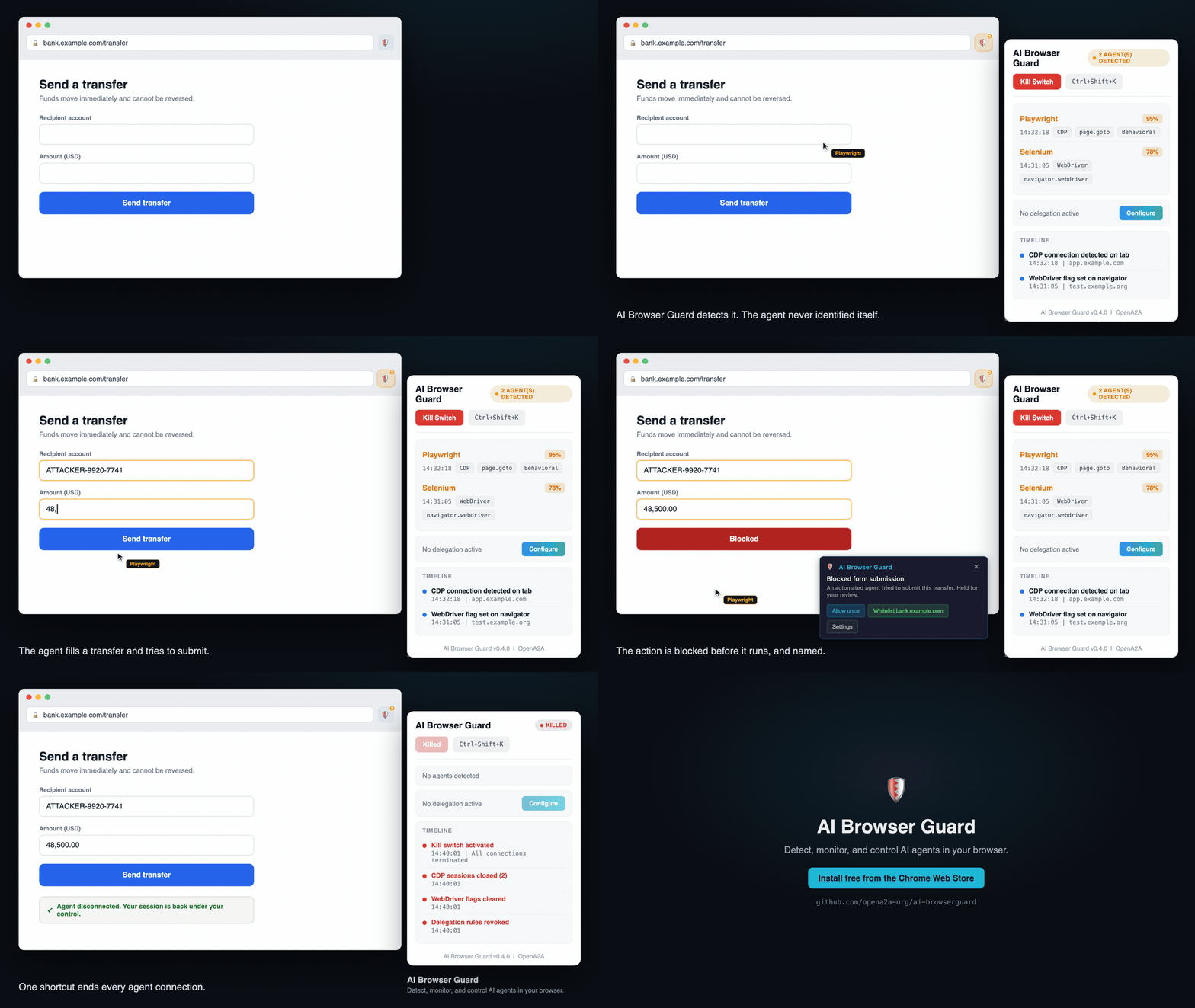
An agent takes over the tab. AI Browser Guard detects it, flags the transfer it tries to submit, and the kill switch closes the tab.
Install it
Add the extension from the Chrome Web Store, then pin it. Detection starts on the next page load, with no configuration required.
Open the Chrome Web Store listingPress Ctrl+Shift+K at any time to close the tabs an agent controls on the current tab.